



This product is available natively in English, but it has automated translations for most major languages.
Contents: Keyboard Dynamic Repeat (⌨⌚), Keyboard Hold Next Key (⌨⤓), Keyboard Repeat Next Key (⌨⌚⤓), Keyboard Dynamic Repeat (⌨⌚), Toggle Next Toggle Key (Toggle²Next), Force Paste (⌨)
Keyboard Dynamic Repeat (⌨⌚)
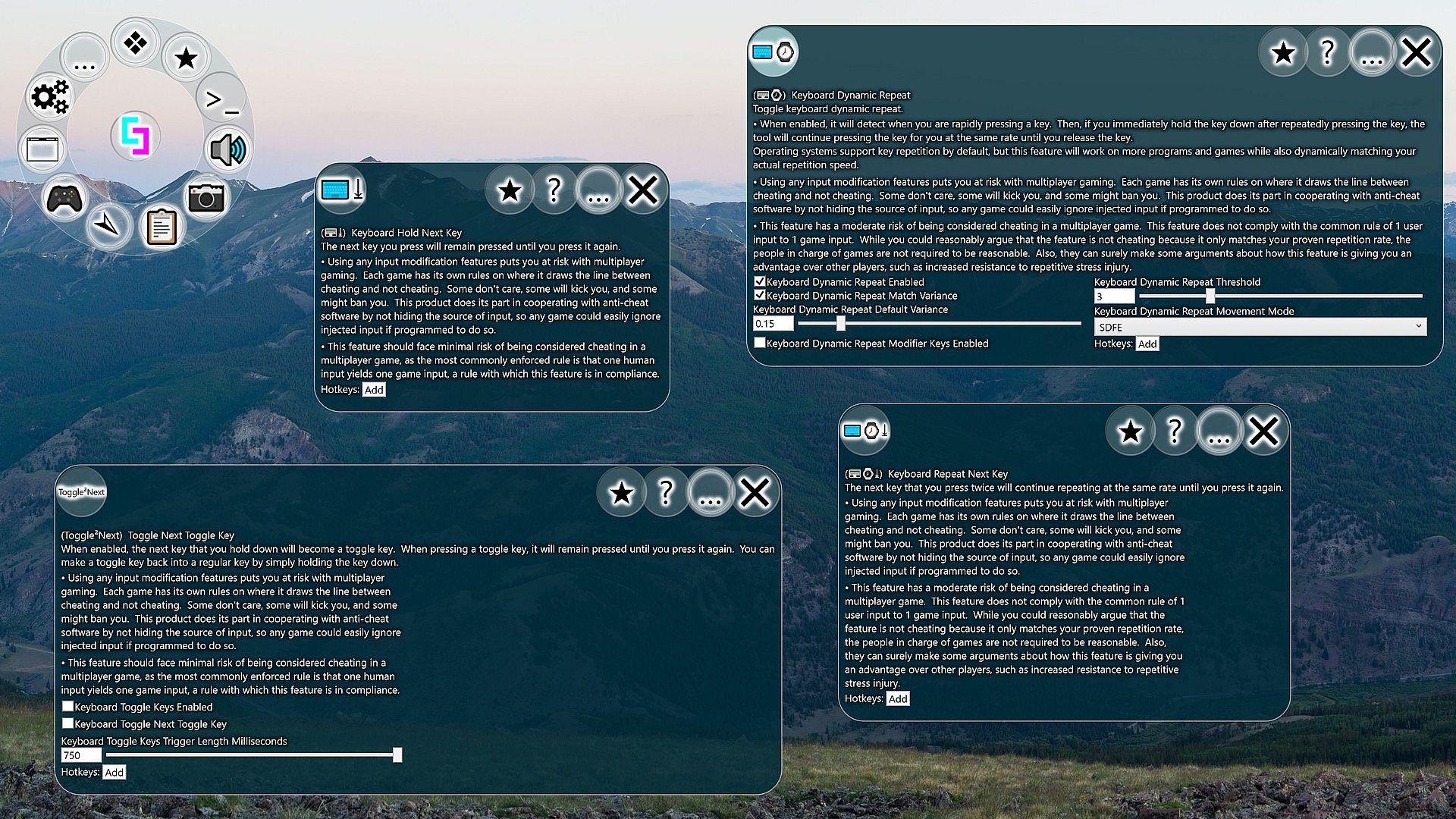
Toggle keyboard dynamic repeat.- When enabled, it will detect when you are rapidly pressing a key. Then, if you immediately hold the key down after repeatedly pressing the key, the tool will continue pressing the key for you at the same rate until you release the key.
Operating systems support key repetition by default, but this feature will work on more programs and games while also dynamically matching your actual repetition speed. - Using any input modification features puts you at risk with multiplayer gaming. Each game has its own rules on where it draws the line between cheating and not cheating. Some don't care, some will kick you, and some might ban you. This product does its part in cooperating with anti-cheat software by not hiding the source of input, so any game could easily ignore injected input if programmed to do so.
- This feature has a moderate risk of being considered cheating in a multiplayer game. This feature does not comply with the common rule of 1 user input to 1 game input. While you could reasonably argue that the feature is not cheating because it only matches your proven repetition rate, the people in charge of games are not required to be reasonable. Also, they can surely make some arguments about how this feature is giving you an advantage over other players, such as increased resistance to repetitive stress injury.
- Keyboard Dynamic Repeat Enabled (Default: False)
When enabled, it will detect when you are rapidly pressing a key. Then, if you immediately hold the key down after repeatedly pressing the key, the tool will continue pressing the key for you at the same rate until you release the key.
Operating systems support key repetition by default, but this feature will work on more programs and games while also dynamically matching your actual repetition speed. - Keyboard Dynamic Repeat Match Variance (Default: True)
When repeating the key for you, the keyboard dynamic repeat feature will try to match your natural variance for its repetitions if enabled. - Keyboard Dynamic Repeat Default Variance (Default: 0.15)
When repeating the key for you, the keyboard dynamic repeat feature will vary the timings of key presses according to this value, unless match variance is enabled. - Keyboard Dynamic Repeat Threshold (Default: 3)
This is the number of times you need to repeatedly press a key before the dynamic repeat can kick in. If you choose 2, there will be no variance to match. - Keyboard Dynamic Repeat Movement Mode (Default: 4)
Keyboard Dynamic Repeat can cause issues with movement keys. This can be solved by having it ignore the movement keys. Arrow keys will be ignored in every choice except "None". I have defaulted this value to the arrow keys and begrudgingly to WASD. While I fear I have betrayed my ESDF compatriots, I do not doubt their ability to easily find this setting and set it to the superior movement keys. Long live ESDF!
- 0
- 1
- 2
- 3
- 4
- 5 - Keyboard Dynamic Repeat Modifier Keys Enabled (Default: False)
Keyboard Dynamic Repeat can be easily triggered by modifier keys due to the way they are typically used, which can cause more problems than it is worth. By default, Control, Alt, Shift, and Windows Key are not handled by Keyboard Dynamic Repeat for this reason, but you can enable these keys with this setting.
Keyboard Hold Next Key (⌨⤓)
The next key you press will remain pressed until you press it again.- Using any input modification features puts you at risk with multiplayer gaming. Each game has its own rules on where it draws the line between cheating and not cheating. Some don't care, some will kick you, and some might ban you. This product does its part in cooperating with anti-cheat software by not hiding the source of input, so any game could easily ignore injected input if programmed to do so.
- This feature should face minimal risk of being considered cheating in a multiplayer game, as the most commonly enforced rule is that one human input yields one game input, a rule with which this feature is in compliance.
Keyboard Repeat Next Key (⌨⌚⤓)
The next key that you press twice will continue repeating at the same rate until you press it again.- Using any input modification features puts you at risk with multiplayer gaming. Each game has its own rules on where it draws the line between cheating and not cheating. Some don't care, some will kick you, and some might ban you. This product does its part in cooperating with anti-cheat software by not hiding the source of input, so any game could easily ignore injected input if programmed to do so.
- This feature has a moderate risk of being considered cheating in a multiplayer game. This feature does not comply with the common rule of 1 user input to 1 game input. While you could reasonably argue that the feature is not cheating because it only matches your proven repetition rate, the people in charge of games are not required to be reasonable. Also, they can surely make some arguments about how this feature is giving you an advantage over other players, such as increased resistance to repetitive stress injury.
Keyboard Dynamic Repeat (⌨⌚)
Toggle keyboard dynamic repeat.- When enabled, it will detect when you are rapidly pressing a key. Then, if you immediately hold the key down after repeatedly pressing the key, the tool will continue pressing the key for you at the same rate until you release the key.
Operating systems support key repetition by default, but this feature will work on more programs and games while also dynamically matching your actual repetition speed. - Using any input modification features puts you at risk with multiplayer gaming. Each game has its own rules on where it draws the line between cheating and not cheating. Some don't care, some will kick you, and some might ban you. This product does its part in cooperating with anti-cheat software by not hiding the source of input, so any game could easily ignore injected input if programmed to do so.
- This feature has a moderate risk of being considered cheating in a multiplayer game. This feature does not comply with the common rule of 1 user input to 1 game input. While you could reasonably argue that the feature is not cheating because it only matches your proven repetition rate, the people in charge of games are not required to be reasonable. Also, they can surely make some arguments about how this feature is giving you an advantage over other players, such as increased resistance to repetitive stress injury.
- Keyboard Dynamic Repeat Enabled (Default: False)
When enabled, it will detect when you are rapidly pressing a key. Then, if you immediately hold the key down after repeatedly pressing the key, the tool will continue pressing the key for you at the same rate until you release the key.
Operating systems support key repetition by default, but this feature will work on more programs and games while also dynamically matching your actual repetition speed. - Keyboard Dynamic Repeat Match Variance (Default: True)
When repeating the key for you, the keyboard dynamic repeat feature will try to match your natural variance for its repetitions if enabled. - Keyboard Dynamic Repeat Default Variance (Default: 0.15)
When repeating the key for you, the keyboard dynamic repeat feature will vary the timings of key presses according to this value, unless match variance is enabled. - Keyboard Dynamic Repeat Threshold (Default: 3)
This is the number of times you need to repeatedly press a key before the dynamic repeat can kick in. If you choose 2, there will be no variance to match. - Keyboard Dynamic Repeat Movement Mode (Default: 4)
Keyboard Dynamic Repeat can cause issues with movement keys. This can be solved by having it ignore the movement keys. Arrow keys will be ignored in every choice except "None". I have defaulted this value to the arrow keys and begrudgingly to WASD. While I fear I have betrayed my ESDF compatriots, I do not doubt their ability to easily find this setting and set it to the superior movement keys. Long live ESDF!
- 0
- 1
- 2
- 3
- 4
- 5 - Keyboard Dynamic Repeat Modifier Keys Enabled (Default: False)
Keyboard Dynamic Repeat can be easily triggered by modifier keys due to the way they are typically used, which can cause more problems than it is worth. By default, Control, Alt, Shift, and Windows Key are not handled by Keyboard Dynamic Repeat for this reason, but you can enable these keys with this setting.
Toggle Next Toggle Key (Toggle²Next)
When enabled, the next key that you hold down will become a toggle key. When pressing a toggle key, it will remain pressed until you press it again. You can make a toggle key back into a regular key by simply holding the key down.- Using any input modification features puts you at risk with multiplayer gaming. Each game has its own rules on where it draws the line between cheating and not cheating. Some don't care, some will kick you, and some might ban you. This product does its part in cooperating with anti-cheat software by not hiding the source of input, so any game could easily ignore injected input if programmed to do so.
- This feature should face minimal risk of being considered cheating in a multiplayer game, as the most commonly enforced rule is that one human input yields one game input, a rule with which this feature is in compliance.
- Keyboard Toggle Keys Enabled (Default: False)
If you have set some keys to become locking keys, disabling this setting will disable the lock keys. - Keyboard Toggle Next Toggle Key (Default: False)
When enabled, the next key that is pressed will be converted into a key that alternates between pressed and not pressed each time it is physically pressed. - Keyboard Toggle Keys Trigger Length Milliseconds (Default: 750)
When creating a toggle key or removing a toggle key, you hold the key down for longer than this duration.
Force Paste (⌨)
Forcibly paste the clipboard contents via the keyboard.Settings:
- Force Paste Milliseconds Key Duration (Default: 1)
Some systems/programs may experience issues with input that is sent too quickly, so raising this value could alleviate such problems. - Force Paste Milliseconds Between Keys (Default: 1)
Some systems/programs may experience issues with input that is sent too quickly, so raising this value could alleviate such problems. - Force Paste Alternative Behavior (Default: False)
If you are facing issues with the standard behavior, try to flip this option on and see if it works better for you. The alternative behavior currently does not support the additional timing options. - Force Paste Dangerous Mode (Default: False)
Enables SendKeys commands when executing ForcePaste. Also includes an additional {DELAY 1000} command which delays by the number of milliseconds specified. Enabling this feature is potententially dangerous because someone could put an evil command in your clipboard without you knowing, so you could accidentally execute the evil command if you perform a force paste. - Force Paste Unquote (Default: False)
If enabled, removes start and ending quotes when using Force Paste. Some programs like to put quotes around information that you are copying. If you are getting creative with using Force Paste to fill out forms from a spread sheet, for example, going back and removing the outside quotes can interrupt your workflow.